
The UCLA Information Security Office is aware of a phishing campaign targeting members of the UCLA community using emails with subjects similar to "SPECIAL INVITATION," "YOU ARE INVITED," or "JOIN US FOR A SPECIAL GATHERING." These messages are disguised as electronic greeting cards or invitations and are designed to trick recipients into clicking a malicious link.
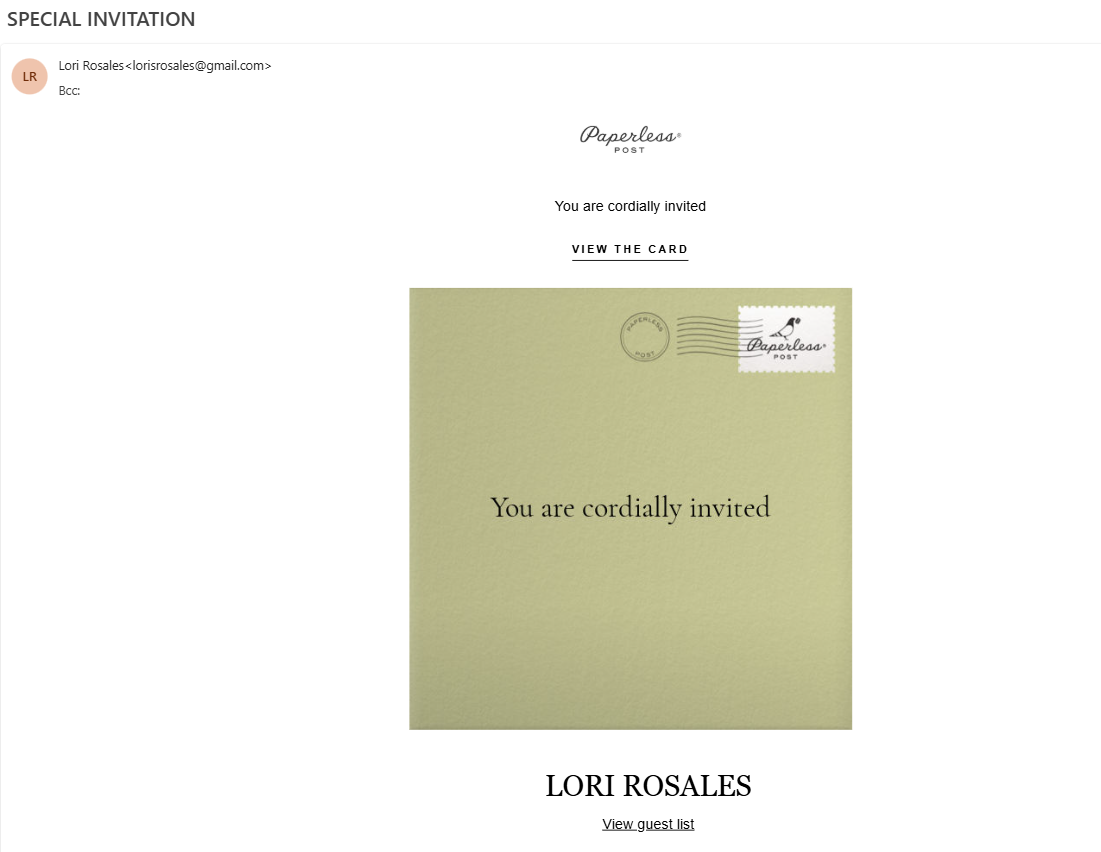
Many of these phishing emails are designed to imitate invitations sent through Paperless Post, a legitimate online invitation service. While the email may closely resemble a genuine Paperless Post invitation, it is not actually sent by the service.
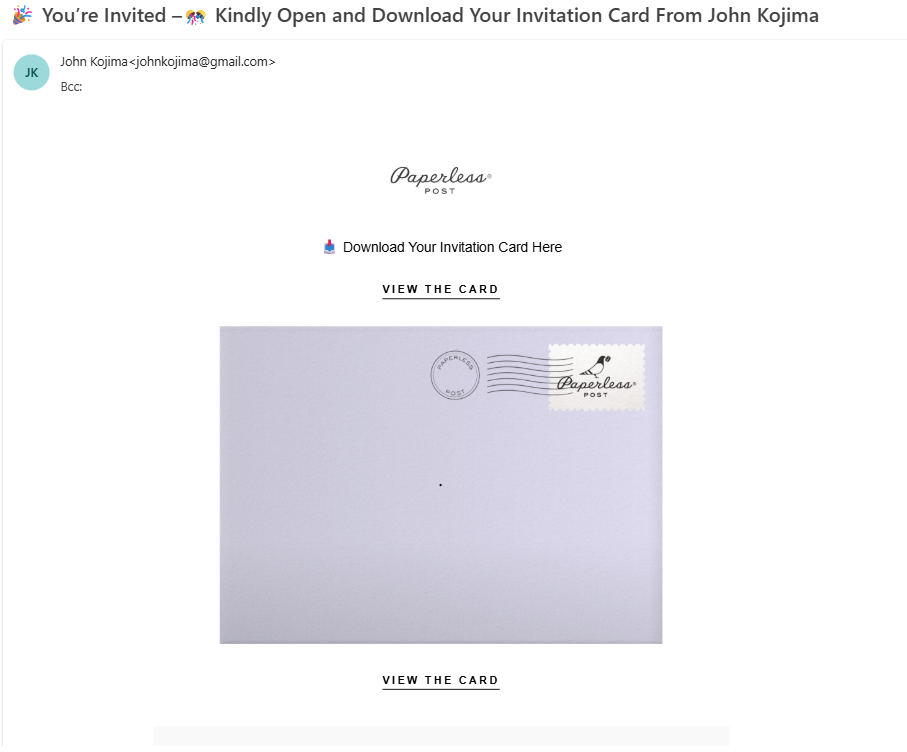
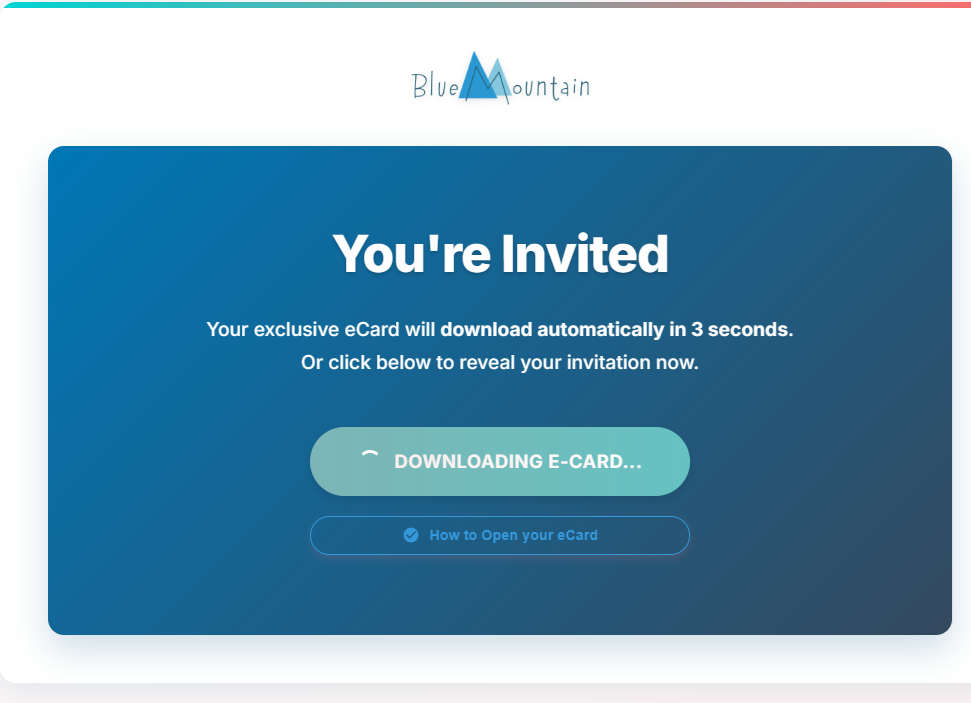
Depending on the campaign, clicking the "View this card" button may redirect you to a fraudulent website that attempts to steal your UCLA Logon credentials or prompt you to download an eCard file. These downloaded files may contain malware, including remote access software, which can allow an attacker to gain unauthorized access to your computer and data.
To increase the likelihood that recipients will trust the message, the sender's display name may appear to be a colleague, supervisor, friend, or other familiar contact. However, the actual sender email address may not belong to the person it claims to represent.
Key Indicators of the Phishing Attempt
- Subject lines similar to "SPECIAL INVITATION," "YOU ARE INVITED," or "JOIN US FOR A SPECIAL GATHERING."
- Claims you have received an electronic invitation or greeting card.
- Designed to look like a Paperless Post invitation.
- Includes a "View this card" button or similar call-to-action.
- May display the name of a colleague, friend, or other familiar contact to appear legitimate.
If the invitation claims to be from Paperless Post, verify the sender's email address. Paperless Post emails will come from an official “@paperlesspost.com” address. Be cautious of emails sent from other addresses claiming to be Paperless Post.
Ex. The email is claiming to be from Paperless Post, but the sender email address is from "@gmail.com."
- The display name and email address may appear consistent, but the email address belongs to an attacker using a different domain (e.g., john.smith@gmail.com instead of john.smith@ucla.edu).
- The display name may not match the sender's email address, or the email address itself may be a lookalike or otherwise not belong to the person it claims to represent.
- Redirects to a website requesting you to sign in, provide personal information, or download an eCard.
- Prompts you to download a file claiming to be an invitation or greeting card.
- Uses curiosity or urgency to encourage you to click the link or open the downloaded file.
What You Should Do
- Do not click the "View this card" button or any other links in the email.
- Do not download or open any files attached to or linked from the message.
- Do not enter your UCLA credentials or any personal information if prompted.
- Verify the sender's full email address, not just the display name. If the invitation claims to be from Paperless Post, confirm it was sent from an official “@paperlesspost.com” address.
- If the invitation appears to come from someone you know, contact that person directly using a known UCLA email address or phone number to verify that they actually sent the invitation. Do not use the contact information provided in the suspicious email.
- Report the email to security@ucla.edu.
- Delete the message from your inbox and trash folder.
If you have already clicked the link, downloaded or opened a file, or entered your credentials, contact the UCLA Information Security Office immediately so appropriate steps can be taken to help secure your account and device.
Stay Vigilant
Cybercriminals frequently impersonate trusted individuals and legitimate services such as Paperless Post to increase the likelihood that recipients will click malicious links or install malware. Always inspect the sender's full email address—not just the display name—and verify unexpected invitations with the purported sender using a known email address or phone number before taking any action. When in doubt, do not interact with the email and report it to the UCLA Information Security Office.
Below are several examples of what the invite emails may look like.
If clicked on, you may be taken to a similar webpage that is attempting to download a malicious file:
How to Report a Phishing Scam
The UCLA Information Security Office requests that campus users report phishing messages to our team so that we can proactively alert campus users and bring awareness to widespread phishing campaigns. In order for the Information Security Office to take action in response to a reported phishing message, please follow these steps:
- Please follow instructions on How to Report a Phishing Scam
- Send the resulting message and attachment to security@ucla.edu(link sends email)(link sends email) with a subject line identifying the message as a phishing report.
It is important to be aware of fraudulent phishing schemes. Check back here as we update the list below with known phishing attempts.